
Thailand eSIM Guide (2026): Best eSIMs for Tourists, Prices & Setup
Landing in Bangkok without internet is one of the fastest ways to turn an exciting first hour in Thailand into a stressful one. No Grab, no Google Maps, no way to message your hotel or check your booking confirmation. That is why, for most travelers today, sorting out mobile data before the flight matters just as much as packing a passport.
This guide walks through everything you need to get connected in Thailand in 2026: what an eSIM actually is, which providers are worth your money, how coverage holds up across the country including the islands, and how to install one step by step. It is written for first time visitors and repeat travelers alike, whether you need a week of maps and messaging or a full month of remote work data.
What Is an eSIM?
An eSIM (embedded SIM) is a digital SIM card built into your phone's hardware. Instead of popping out a plastic tray and inserting a physical chip, you scan a QR code or tap an activation link, and a mobile data profile installs itself onto your device.
How an eSIM Works
When you buy a Thailand eSIM, the provider sends you a QR code by email or through their app. Scanning it downloads a small profile onto your phone that connects to a local Thai network, usually AIS, True, or DTAC. Once you land and turn on data roaming, your phone picks up a signal automatically, without you ever touching a physical SIM tray.
Physical SIM vs eSIM
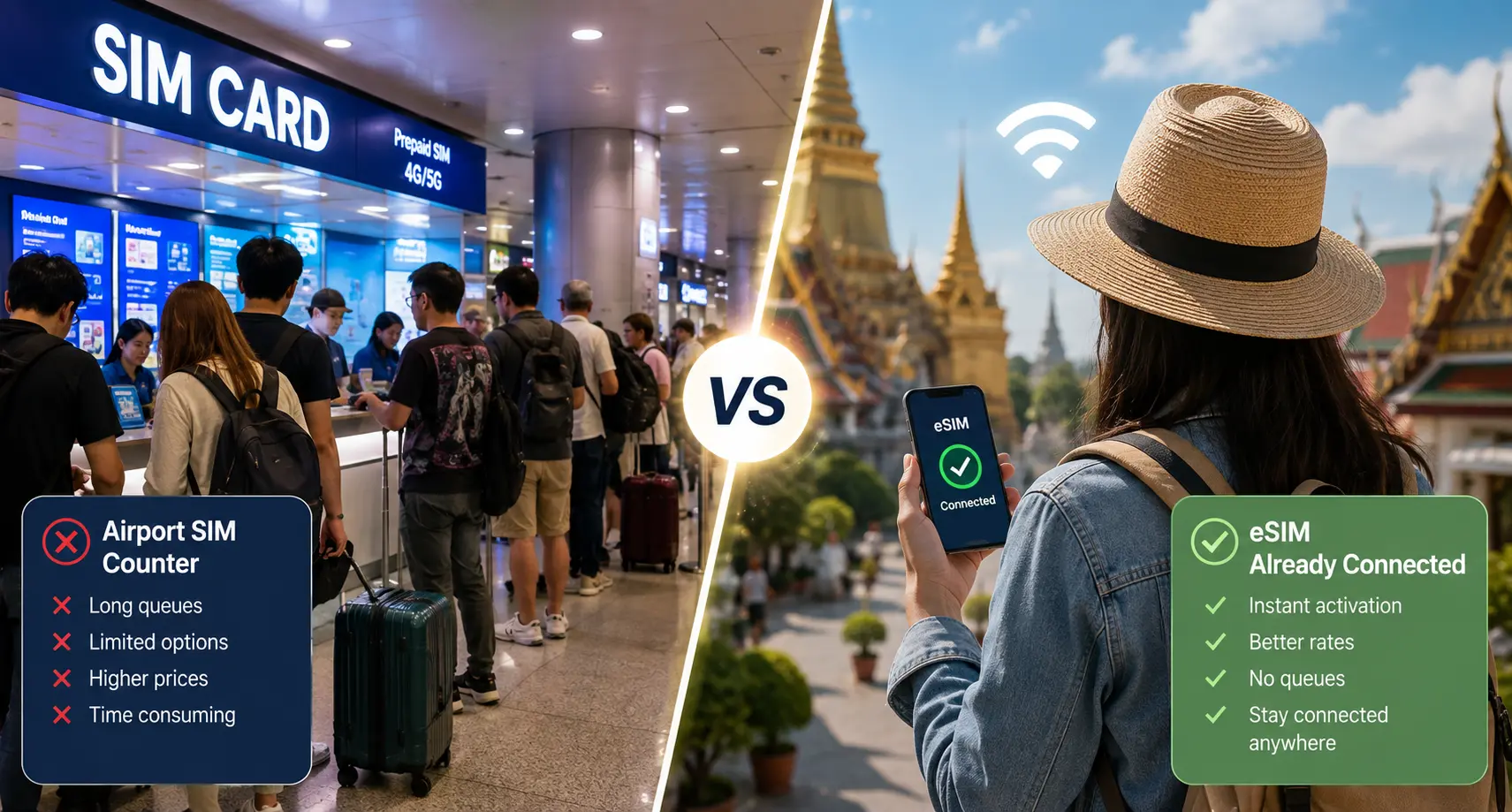
A physical SIM requires a trip to a phone shop or airport kiosk, a queue, sometimes a passport scan, and a small piece of plastic you need to keep track of and swap back out later. An eSIM skips all of that. You can buy it from your couch, install it before you board, and keep your original SIM in place the whole time.
Advantages for International Travelers
The biggest advantage is speed. You are online the moment you land rather than after standing in an arrivals hall queue. You also avoid losing or damaging your home SIM card, and most eSIM apps let you monitor data usage in real time so there are no surprise charges.
Why Use an eSIM in Thailand?
Activate Before You Arrive
Most eSIMs let you install the profile at home and simply switch it on after landing, so you are not fumbling with settings at the airport.
Instant Internet After Landing
No searching for a SIM booth or waiting for a shop to open.
No SIM Swapping
Your home SIM stays in the phone, so you keep receiving calls and texts on your regular number if you need to.
Keep Your Home Number Active
Because most travel eSIMs are data-only, your phone effectively runs two profiles at once, home number for calls and texts, Thailand eSIM for data.
Built for How You'll Actually Use Your Phone
Google Maps for navigating Bangkok's sois, Grab for rides and food delivery, translation apps at markets, mobile banking, and messaging apps like WhatsApp and LINE all need a steady data connection from the moment you land.
Download Offline Maps as a Backup
Even with excellent coverage in most tourist areas, downloading offline maps before island trips or mountain excursions provides an extra layer of reliability. It's a simple habit that means you're never fully stranded if a ferry crossing or a rural stretch of road has a weak signal.
Best Thailand eSIM Providers
Thailand's eSIM market runs almost entirely on three local networks: AIS, True, and DTAC (DTAC and True merged in 2023, so you'll often see them referred to together). Coverage differences between providers usually come down to which of these networks they connect to, plus how their data caps and pricing are structured. Here is how the major players compare.
Nomad
- Coverage: Runs on Thailand's True network.
- Data plans: Six single-country Thailand plans ranging from around 1GB up to 50GB, plus dozens of regional and global bundles that also work in Thailand.
- Validity: Options from a few days up to a full year on global plans.
- Pros: Competitive pricing on big data bundles, simple app, no contracts, frequent promotions.
- Cons: No phone number or SMS, so calls need to go through WhatsApp or similar apps.
- Best for: Travelers who want a large data allowance at a low price per gigabyte.
Holafly
- Coverage: Connects through Thailand's True/DTAC network.
- Data plans: Every Thailand plan is unlimited data, with durations from around 5 days up to 90 days.
- Validity: Flexible day counts, with better per-day rates the longer you stay.
- Pros: No need to track a data allowance, genuinely useful for streaming or heavy hotspot use, simple setup.
- Cons: Noticeably more expensive per day than capped-data competitors, especially for short trips.
- Best for: Long stays, remote workers, or anyone who wants to stop thinking about data limits entirely.
Saily
- Coverage: Connects to Thailand's local network infrastructure with solid coverage in major tourist areas.
- Data plans: Entry plans start around 1GB for a week, scaling up to 20GB for a month, with a customizable unlimited option available for 10 to 30 days.
- Validity: Mostly 7 or 30 day options, plus custom unlimited durations.
- Pros: Very approachable app, budget-friendly entry plans, extra features like a virtual location tool and ad blocker.
- Cons: No phone number, and the cheapest plans carry limited data for longer trips.
- Best for: First-time eSIM users and light data users who want a simple setup experience.
Jetpac
- Coverage: Uses Thailand's AIS network, generally considered the strongest and most rural-friendly of the three.
- Data plans: One of the widest local plan selections available, from around 1GB up to 100GB, across 4 to 30 day validity windows. Plans labeled "unlimited" typically include a set amount of high-speed data per day (commonly around 3GB) before speeds are reduced.
- Validity: 4 to 30 days on local plans.
- Pros: Free access to WhatsApp, Uber, Grab, and Google Maps even after your data allowance runs out, optional airport lounge access add-on, strong AIS coverage.
- Cons: No true unlimited high-speed plan, no phone number.
- Best for: Travelers who want flexibility in plan size plus a safety net if they run out of data.
Airalo
- Coverage: Uses a combination of Thailand's AIS and True networks.
- Data plans: Fixed plans from around 5GB to 20GB with 7, 15, or 30 day validity, plus unlimited options from 3 to 30 days. It is also one of the few providers offering a plan that bundles in call minutes and texts alongside data.
- Validity: 7, 15, or 30 days on most plans.
- Pros: Large, well-reviewed app, wide device compatibility, one of the only options with an optional voice and text bundle.
- Cons: Entry-level fixed plans cost more per gigabyte than budget competitors, and the unlimited plans are throttled after a daily high-speed threshold.
- Best for: Travelers who want a trusted, widely used brand and don't mind paying slightly more for it.
Thailand eSIM Price Comparison
Prices shift often with promotions, so treat the figures below as a general 2026 snapshot rather than a fixed price list. Always check the provider's site for the current rate before buying.
| Provider | Data | Validity | Approximate Price | Hotspot Support |
|---|---|---|---|---|
| Saily | 1GB | 7 days | ~$3 | Yes |
| Nomad | 1GB | 7 days | ~$4-5 | Yes |
| Jetpac | 1GB | 4 days | ~$4 | Yes |
| Airalo | 5GB | 7 days | ~$8-12 | Yes |
| Saily | 10GB | 30 days | ~$9 | Yes |
| Nomad | 50GB | 30 days | ~$12-16 | Yes |
| Jetpac | 15GB | 7-30 days | ~$11-29 | Yes |
| Holafly | Unlimited | 10 days | ~$35-40 | Check plan terms |
| Airalo | Unlimited | 10 days | ~$28-31 | Check plan terms |
A local airport tourist SIM (AIS or DTAC) typically runs somewhere between $9 and $14 for around 8 to 15 days of "unlimited" data, which competes well on price but requires you to queue after landing and swap out your home SIM card. For most travelers, the convenience of pre-activating an eSIM before departure outweighs the modest savings of an airport SIM.
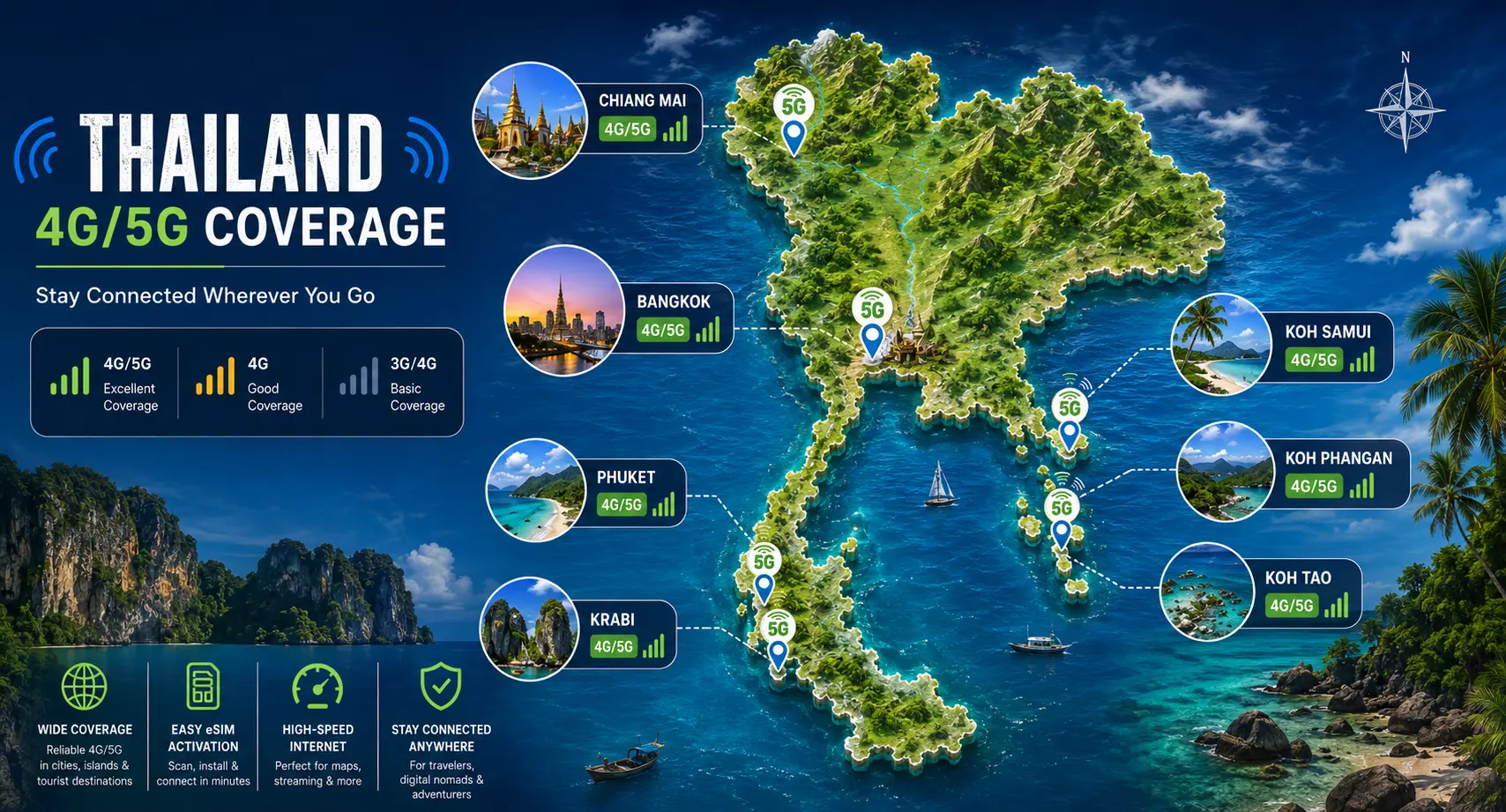
Coverage Across Thailand
Thailand's three networks (AIS, True, DTAC) cover the country well overall, but signal strength does vary by region and by which network your eSIM connects to.
Bangkok
Excellent 4G and 5G across the entire city, including the BTS, MRT, shopping malls, and major tourist attractions.
Phuket
Strong coverage in Patong, Kata, Karon, and the airport corridor, with 5G widely available in tourist areas.
Chiang Mai
Reliable 4G and expanding 5G throughout the Old City and Nimman, with weaker coverage in surrounding mountains.
Krabi
Good signal around Ao Nang and Krabi Town, though coverage can weaken on smaller offshore islands.
Phi Phi Islands
Reliable service around Tonsai Village, but speeds may fluctuate on boat trips and at more remote beaches.
Pattaya
Strong 4G and 5G coverage throughout Pattaya City, Jomtien Beach, and nearby attractions.
Koh Samui
Consistent 4G coverage across Chaweng, Lamai, Fisherman's Village, and most of the island.
Koh Phangan
Good signal around Haad Rin and Thong Sala, with patchier coverage in quieter northern beaches.
Koh Tao
Reliable 4G in Mae Haad and Sairee Beach, while the east coast and offshore dive sites may have weaker reception.
AIS generally offers the widest rural and island coverage, making it a good choice for travelers visiting remote destinations. Regardless of your provider, downloading offline maps before visiting smaller islands or national parks is a smart backup in case the signal becomes weak.
How to Install a Thailand eSIM
Step 1: Check Phone Compatibility
Confirm your phone supports eSIM and is carrier-unlocked. Most iPhones from the XS/XR generation onward, Samsung Galaxy S20 and newer, and Google Pixel 3 and newer all support eSIM.
Step 2: Purchase Your eSIM
Buy through the provider's app or website before your trip. You'll receive a QR code and activation instructions by email or in-app.
Step 3: Install via QR Code
Go to your phone's Cellular or Mobile Data settings, choose Add eSIM or Add Cellular Plan, and scan the QR code.
Step 4: Activate the Plan
Depending on the provider, the plan either activates immediately or automatically once your phone detects a Thai network for the first time.
Step 5: Enable Data Roaming
Turn on data roaming for your new eSIM profile. Without this setting enabled, the eSIM may not connect even if it is installed correctly.
Step 6: Test Your Connection
After landing, open a browser, Google Maps, or another app to confirm your internet connection before leaving the airport.
Compatible Phones
- iPhone: XS, XR, and all newer models, including the iPhone 11 through iPhone 17 series.
- Samsung Galaxy: S20 and newer, plus most Note20, Z Fold, and Z Flip models.
- Google Pixel: Pixel 3 and newer.
- Other Devices: Many newer Huawei, Oppo, Motorola, and other flagship Android phones also support eSIM, though compatibility varies by model.
Phones purchased through certain US carriers may have eSIM functionality locked. If you're unsure, check your phone's Cellular or Mobile Network settings for an Add eSIM option, or search your exact phone model together with the phrase "eSIM compatible" before purchasing.
eSIM vs Physical SIM Card
| Factor | eSIM | Physical SIM |
|---|---|---|
| Price | Similar to slightly higher for equivalent data | Often marginally cheaper, especially at the airport |
| Convenience | Install from anywhere, no queue | Requires a shop visit or airport kiosk |
| Activation | Instant via QR code | May need ID or passport verification in person |
| Airport Pickup | Not needed | Requires finding a counter after landing |
| Network Quality | Same local networks as physical SIMs | Same local networks as eSIMs |
| Flexibility | Easy to switch plans or top up in-app | Requires a new physical SIM to switch providers |
Network quality is essentially identical between the two since eSIMs run on the same AIS, True, and DTAC infrastructure as physical SIMs. The real difference is convenience, and for most travelers that convenience is worth any small price gap.
Should You Buy an eSIM or an Airport SIM?
If you land in Bangkok or Phuket without a plan, airport SIM counters are everywhere and staff will get you set up in a few minutes. So the real question isn't availability, it's whether waiting until you land is worth the trade-off.
An airport SIM can save you a few dollars and comes from a counter you can see and ask questions at in person. But it also means standing in a queue after a long flight, handing over your passport for registration, and losing your first hour in the country to admin instead of your itinerary. It also means physically removing your home SIM, which is easy to lose in transit.
An eSIM flips that trade-off. You buy and install it before you fly, so your data is live the moment your plane lands, no counter, no queue, no swapped SIM tray. The cost difference between the two is usually small, often just a dollar or two on comparable plans, which makes the time saved the deciding factor for most travelers.
Choose an Airport SIM If
- You want to pay in cash.
- You prefer speaking to a person before choosing a plan.
- You need a Thai phone number.
- Your phone does not support eSIM.
Choose an eSIM If
- You want internet the moment you land.
- You don't want to remove your home SIM card.
- You prefer setting everything up before departure.
- You want a fast, contact-free activation process.
How Much Data Do You Need?
Light Users
Maps, messaging, and occasional social media use typically require 3–5GB for a one-week trip.
Regular Travelers
For Google Maps, social media, ride-hailing apps, and some video streaming, 10–15GB is usually enough for a one to two week holiday.
Digital Nomads
If you rely on video calls, cloud storage, or use your phone as a hotspot for a laptop, choose an unlimited plan or a 30GB+ package and check hotspot support before buying.
Families
When multiple devices share a hotspot, a 20–50GB plan or an unlimited package is often more economical than buying several smaller eSIMs.
Heavy Users
If you regularly stream videos, upload large files, or make frequent video calls, an unlimited plan from providers such as Holafly or Airalo offers the most hassle-free experience, provided the daily high-speed limit meets your needs.
Tips for Using an eSIM in Thailand
Download Offline Maps
Download offline maps for your destinations before you leave home, especially if you're visiting islands or remote areas where mobile coverage may occasionally be weak.
Enable Wi-Fi Calling
Turn on Wi-Fi calling so you can continue making and receiving calls over Wi-Fi, even if your travel eSIM does not include a local phone number.
Monitor Your Data Usage
Use your eSIM provider's app to track your remaining data and avoid unexpectedly running out during your trip.
Save Your QR Code
Keep a copy of your activation QR code as a screenshot or in your email so you can reinstall the eSIM if needed.
Use Hotspot Carefully
If your plan supports tethering, remember that sharing your connection with laptops or other devices consumes data much faster.
Reduce Battery Drain
Turn off Bluetooth and unnecessary location services when not in use. GPS and mobile data can quickly drain your battery in Thailand's warm climate.
Common Problems & Solutions
QR Code Not Scanning
Make sure you're viewing the QR code on a separate device, such as a laptop, tablet, or printed copy, rather than trying to scan it on the same phone you're installing it on. If you're scanning from an email, increase the brightness of the screen displaying the code.
No Network After Landing
Check that Data Roaming is enabled for the eSIM profile specifically, not just your primary SIM. You can find this option in your phone's Cellular or Mobile Network settings.
Slow Internet Speed
You may have reached the daily high-speed data limit on an "unlimited" plan. Review your provider's fair usage policy or connect to Wi-Fi when available until your high-speed allowance resets.
Incorrect APN Settings
Most eSIMs configure the APN automatically. If your mobile data still isn't working, visit your provider's support page and manually enter the recommended APN settings.
Activation Failed
Delete the existing eSIM profile and reinstall it using a fresh QR code from your provider. If the problem continues, contact the provider's customer support. Most major eSIM providers offer 24/7 live chat assistance.
Data Not Working After Installation
Restart your phone after installing the eSIM. A simple reboot resolves many connectivity issues by allowing the device to properly register on the local mobile network.
Frequently Asked Questions
What is the best eSIM for Thailand?
There isn't a single best option for everyone. Nomad and Saily tend to offer the best value for fixed data bundles, Jetpac stands out for plan variety and its free-app safety net, while Holafly and Airalo are better suited to travelers who prefer unlimited data without monitoring their usage.
Can I buy an eSIM before arriving in Thailand?
Yes. Every major provider lets you purchase and install your Thailand eSIM before you travel, so it is ready to activate as soon as your phone connects to a local network after landing.
Does an eSIM work in Phuket?
Yes. Phuket has excellent 4G coverage and expanding 5G coverage throughout major tourist areas, including Patong, Kata, Karon, Phuket Town, and the airport.
Does an eSIM work on the Thai islands?
Yes. Popular islands such as Koh Samui, Koh Phangan, and Koh Tao have reliable coverage, although signals may become weaker in remote areas or while traveling by boat.
Is an eSIM better than buying a SIM card at the airport?
For most travelers, yes. An eSIM allows you to get online immediately after landing without waiting in line or replacing your home SIM card. Airport SIM cards can sometimes cost slightly less, but they are generally less convenient.
Can I keep my WhatsApp number?
Yes. Most Thailand travel eSIMs provide data only, allowing your existing SIM and phone number to remain active. Your WhatsApp account continues to work with your existing number.
Which phones support eSIM?
Most iPhone models from the XS and XR onwards, Samsung Galaxy S20 series and newer, Google Pixel 3 and newer, plus many recent flagship Android devices support eSIM technology. Check your exact device model if you are unsure.
How much data do I need for a week in Thailand?
For typical travel activities such as Google Maps, messaging, ride-hailing apps, and social media, around 5–10GB is generally enough for a one-week trip.
Can I share my internet using a hotspot?
Most Thailand eSIM providers support hotspot or tethering, but not every plan includes this feature. Always check the provider's plan details before purchasing if hotspot sharing is important to you.
Can I use both my home SIM and a Thailand eSIM at the same time?
Yes. Most modern dual SIM phones allow you to keep your physical home SIM active for calls and text messages while using your Thailand eSIM for mobile data throughout your trip.
Plan Your Thailand Trip
Now that your internet is sorted, continue planning your trip with these essential Thailand travel guides covering destinations, transportation, budgeting, safety, and packing.